
This page provides information to assist digital service providers (DSPs) (which includes Sending Service Providers) with implementing the Cloud software authentication and authorisation (CAA) solution.
The CAA solution is part of the ATO’s authentication and authorisation solution, which includes myID, RAM and Access Manager.
Summary
The CAA solution allows a business or tax practitioner to authorise a Cloud Service Provider’s (DSP or SSP) dedicated machine credential for the purposes of securing a transmission/lodgment to the ATO via online 'cloud' software.
Where a software product uses a STP Sending Service Provider (SSP), the SSP fulfils the DSP role as described on this page for STP reporting. Further information specific to STP and SSP obligations is available in the Guide for SSPs to submit STP reports.
How does it work?
- The DSP:
- registers their software product with the ATO Digital Partnership Office (DPO)
- meets the security requirements for the Operational Security Framework
- assesses, tests and certifies their software against the current (SBR1, SBR2 and ATO API portal) testing process
- creates a CAA request ticket in Online services for DSPs.
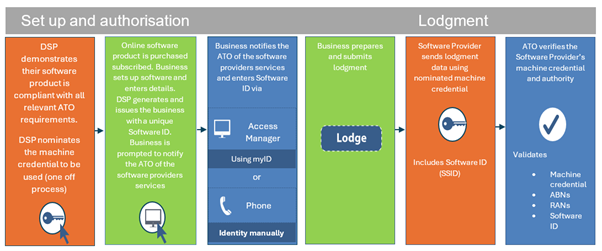
- The DSP nominates a dedicated machine credential (in Access Manager) which is used to secure transmissions initiated by their business clients via online (cloud-enabled) software.
- The DSP develops the capability to generate and issue their clients with a unique Software Subscription ID (SSID), commonly referred to as a ‘Software ID’, based on the requirements described below.
Client on-boarding
- The DSP issues a unique Software ID to each subscriber to their software.
- The DSP’s clients are asked to contact the ATO and authorise the DSP via Access Manager using their myID or over the phone (they must be verified as a business associate to use the phone channel) and provide their ‘Software ID’.
Transmission
- Once the business initiates a transmission (e.g. lodges), the lodgment data (including the Software ID) is sent to the ATO and is secured using the DSP’s dedicated machine credential.
- Once the lodgment data is received, the ATO verifies that the authorisation between the DSP and the business exists, and the Software ID matches the one provided by the business in Access Manager. For registered agents the relationship between their business and their client is also verified.
DSP Requirements
To provide services using the CAA solution, DSPs will be required to ensure their software product meets the requirements outlined below. These are CAA-specific requirements only, other existing SBR, ATO API and machine credential requirements and standards apply.
You will be required to certify that you have met these requirements via a CAA request through Online services for DSPs, before being granted access as an online software provider (hosted SBR software service provider) in Access Manager.
Software ID requirements
The following outlines the requirements around the software's automatic generation of a Software ID.
For DSP products that directly connect to the ATO, the Software ID must:
- be generated using the algorithm provided below and contain 10 digits (leading zeroes are required)
- be unique for each subscription or instance of software
- be passed to the user via a secured electronic communication or over the phone
- be given to the user for the purposes of notifying the ATO of a software provider’s services.
For STP Sending Service Provider products the Software ID must:
- be generated by SSPs using the algorithm provided below, containing 10 digits (leading zeroes are required)
- be unique for each payroll software product used by an employer or a payroll agent - ensuring no duplication within the SSP’s SSID suite
- be provided to authorised users (via DSPs or directly) through secured electronic communication or over the phone
- be given to the user for the purposes of notifying the ATO of a software provider’s services.
The Software ID must not:
- be keyed in by the user for each transmission
- be used as a credential to authenticate the client within online software for lodgment.
Software ID generation algorithm
- Generate the first 9 digits of the Software ID (can be a randomly generated).
- Pad the generated number with leading zeroes on the left to make a 9-digit string.
- Calculate the sum of all digits in the string and apply the Modulo 10 division to calculate the remainder.
- Use the remainder as the 10th control digit.
- Concatenate the generated 9 digits (from step 2) with the control digit (from step 4) to form a 10-digit Software ID.
| Generated number | Zero padded string (9 characters) |
Sum of all digits |
Remainder from division by 10 (control digit) |
Software ID |
| 1 | 000000001 | 0+0+0+0+0+0+0+0+1 = 1 | 1 | 0000000011 |
| 2 | 000000002 | 0+0+0+0+0+0+0+0+2 = 2 | 2 | 0000000022 |
| - | - | - | - | - |
| 478593 | 000478593 | 0+0+0+4+7+8+5+9+3=36 | 6 | 0004785936 |
Additional responsibilities
Compliant with Terms of Use – Business Machine Certificate and associated policies
The current Terms of use – Business Machine Certificate outlines the responsibilities placed upon machine credential holders. The Machine Credential Administrator and the organisation are jointly and severally responsible for the storage and use of the Business Machine Certificate including all transactions and communications carried out under or using it. Failure to uphold these responsibilities will result in the cancellation of the credential.
Cyber security and end user authentication requirements of the Operational Security Framework
The ATO Operational Security Framework (OSF) sets out the minimum level of cyber security requirements a DSP needs to meet to access ATO digital services. The OSF includes a range of requirements which may include multi-factor authentication (MFA).
Taxpayer declaration requirements of the Common Business Implementation Guide and service specific implementation guides
Before lodging a form, a user (business representative or authorised intermediary) must provide an appropriate declaration as outlined in the Payroll event Business Implementation Guide and the ATO Common Business Implementation and Taxpayer Declaration Guide. Lodgments from a registered agent user must include the Registered Agent Number (RAN) as outlined in the ATO ebMS3 Implementation Guide (DOCX, 1.3MB).
Client on-boarding
New and existing subscribers to an online software product will be required to notify the ATO they are using a software providers’ services and present a unique software ID.
If your clients have a myID and are authorised for their business in the Relationship Authorisation Manager (RAM), they can log in to Access Manager to complete their notification. The ATO provides a link to instructions on completing a notification and high-level messages at My hosted SBR software services. This page is the main source of information for software provider clients.
Alternatively, you can instruct them to phone us on 1300 8522 32 and state they would like to 'Notify the ATO of a hosted SBR software service'. Normal proof of record ownership will apply when they phone us.
To further assist software providers to support their clients, the ATO provides responses to frequently asked questions at Cloud software authentication and authorisation – Frequently asked questions.
Transmission
Passing of the software ID for SBR1 (SBR CORE)
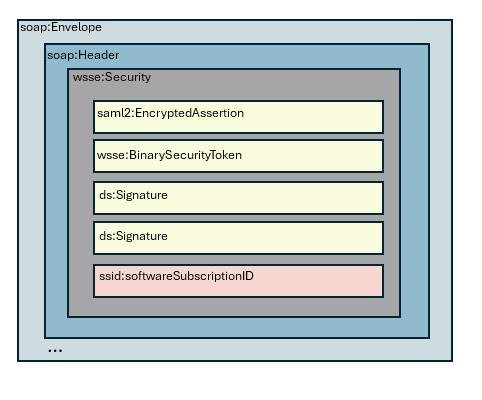
The software ID is passed in the message through an incorporated element called 'softwareSubscriptionId' in the namespace 'http://sbr.gov.au/identifier/softwareSubscriptionId'. This element is located in the web services security extension (wsse)-security header (see the diagram) and can be added into the message after the message generation process is completed (including signing) and it doesn’t break the message integrity or any existing signatures. There will be no impact on the Reference Client and/or DSPs software packages. The SBR Core Services Requester component will be updated to support setting of the 'softwareSubscriptionId'.
Passing of the software ID for SBR 2 (ebMS3)
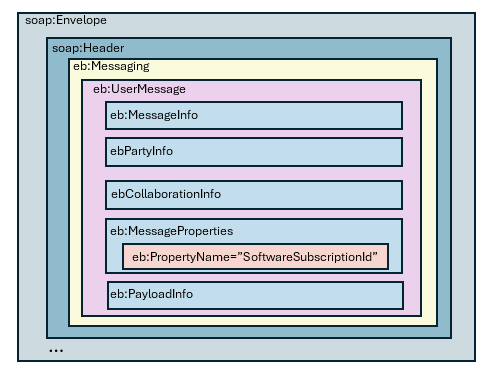
The software ID is passed in the soap:Header by using the ebMS3 custom message property called ‘SoftwareSubscriptionId’. For this purpose, the API of the RequestUserMessage class setMessageProperty(String name, String value) of the embeddable client can be used. The method allows adding a new property with the specified value to the generated message. The property is located in the eb namespace (http://docs.oasis-open.org/ebxml-msg/ebms/v3.0/ns/core/200704/).
Error messages returned by SBR as part of Authorisation checks
The specific error codes and corresponding external error messages have been published in the ATO Authorisation Errors (XLSX, 442KB) hosted on sbr.gov.au.
Passing the software ID for the ATO API Gateway
The software ID is provided when requesting an access token from the ATO Authorisation Server (grant jwt). The grant jwt must also include the external identifier, Australian Business Number (ABN), of the customer. The access token request will fail where no cloud notification has been created in Access Manager by the software user.
Further information regarding using the ATO API Gateway can be found at the ATO API Portal.
Registered DSPs can login to Online Services for DSPs to obtain guidance on integrating to the ATO Authorisation Server.
Assistance in implementing CAA
ATO assistance to support you onboarding to CAA
New cloud software developers and existing DSPs implementing cloud services can seek support from the DPO. If you would like help with onboarding to the CAA solution, raise a ticket in Online services for DSPs. The ATO will assist where possible regarding:
- the onboarding process (e.g. completing the Cloud Software Authentication and Authorisation request and setting up your machine credential)
- designing your software to requirements
- testing and certification processes.
Communications
Software providers are expected to communicate changes to affected businesses and registered agents directly. The ATO provides high-level messages and instructions on completing a notification at My hosted SBR software services.
More information
- The ATO provides responses to some commonly asked questions at CAA - Frequently asked questions.
- Guidance on creating a hosted software notification can be found at My hosted SBR software services.
- If you would like assistance with onboarding to the CAA solution, raise a ticket in Online Services for DSPs.