
This guide is for sending service providers (SSPs) operating a platform or gateway that submits Single Touch Payroll (STP) on behalf of payroll digital service providers (DSPs). For an overview, see Sending service providers (SSP) overview.
On this page
- Registration and onboarding
- Security and operational requirements
- Messaging, transmission and responses
- Output data definitions
- Message structure and identifiers
- Differing requirements dependent on SSP integration models
- Software subscription (SSID) generation and management
- Testing requirements and certification
- Response handling
- Key terms
- Guidance and resources for SSPs
- Guidance and resources for employers and payroll agents
Registration and onboarding
Contact the Digital Partnership Office (DPO) by raising a ticket and a member of DPO will be assigned to guide you through the SSP registration process, including on-boarding and meeting security and operational requirements, in line with the Service model for DSPs.
Security and operational requirements
To operate in production, you must continue to meet the applicable requirements of the Operational Security Framework (OSF). Implement controls for any application programming interfaces (APIs) or portals you deliver, maintain comprehensive audit trails, and have an incident response plan for your security and availability events.
Messaging, transmission and responses
All STP reports are transmitted using SBR ebMS3. Your platform must apply the current ATO schemas and validation rules, construct the correct envelope, and poll for ATO responses. Operationally, you must implement monitoring, alerting and sensible retry/back-off so transmission issues are detected and handled promptly. Outcomes and rejections should be surfaced to the originating DSP or employer according to your service design.
Note that an employer or registered agent may revoke their authorisation in Access Manager. Revocations are not proactively notified to the SSP and are typically detected via a message failure response.
Output data definitions
STP data flows through two stages:
- STP-compliant data is the output produced by the payroll software in line with the STP Business Implementation Guide (BIG), it may be CSV, TXT, or XML as long as all required fields are present for PAYEVNT.
- The SSP then creates STP-conforming data by applying ATO schemas and validation rules and wrapping the payload in an SBR ebMS3 envelope. The SSP must not alter the business content . The originating DSP remains responsible for accuracy and for helping end users correct validation errors.
Message structure and identifiers
To construct a valid submission, your platform needs enough information from the DSP to populate the business document headers (including employer details, product metadata, and the SSID) and the PAYEVNT payroll event payload aligned to current specifications. Product data (BMS name, version, and Product ID) must exactly match ATO registration records. Include the employer’s ABN, and, where applicable, intermediary identifiers (INT/RAN) when a registered agent is involved.
Pre-submit checks:
- Product metadata matches ATO registration
- SSID present, 10 digits, Modulo-10 valid, and registered in Access Manger
- ABN present, INT/RAN present when required
- PAYEVNT version current, envelope conforms to SBR ebMS3
Differing requirements dependent on SSP integration models
SSPs generally offer three integration options:
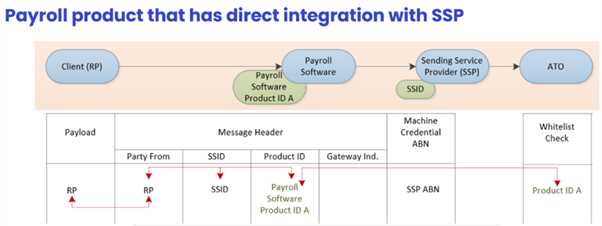
- Direct API – where the payroll product submits through an SSP’s secure infrastructure, for example SSP provided APIs integrated into the payroll software product.
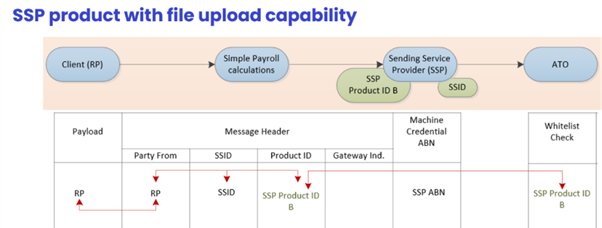
- File upload – where the SSP transforms and submits data uploaded by the user or employer.
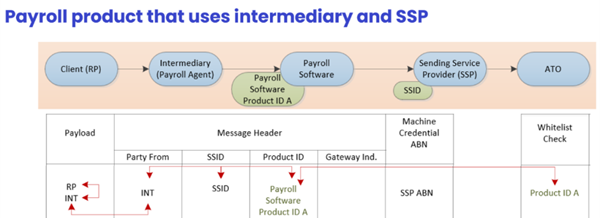
- Intermediary-initiated – where an intermediary agent instructs submission through the SSP.
Payroll product that has direct integration with SSP
SSP product with file upload capability
Payroll product that uses intermediary and SSP
Legend
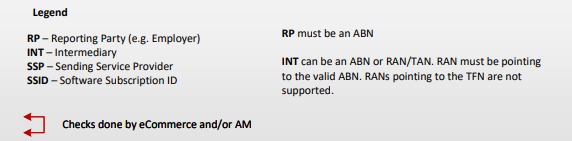
The requirements for the Product ID, Reporting Party identifiers and End User Declaration differs between each integration type.
For more information on the End User Declaration rquirements, please refer to STP Authorisations and Declarations API and SSP Portal Upload Models (PDF, 946KB).
Software subscription (SSID) generation and management
SSPs are required to generate and issue unique SSIDs for each payroll software product used by an employer or a registered agent. SSPs must provide authorised users with their SSID through secure electronic channels (which may include via the DSP product). SSPs should also maintain issuance records so you can investigate authorisation queries and audits. Full requirements and algorithm generation details can be found at Cloud software authentication and authorisation (CAA).
Testing requirements and certification
Before production access, you must complete assessment and External Vendor Test Environment (EVTE) testing, and obtain any required certification. The EVTE scope reflects your role in the reporting chain.
Where the DSP constructs PAYEVNT and enforces schema, your EVTE testing focusses on transmission integrity, receiving compliant output, constructing the envelope from supplied header properties, transmitting successfully, and polling and forwarding outcomes.
Where you perform transformation or schema enforcement, EVTE must show correct transformation to an STP-conforming, ebMS3-wrapped message with correct headers and identifiers, and it must demonstrate expected acceptances for valid cases and expected rejections for invalid cases.
Across both models, validate that errors and outcomes are surfaced back to the DSP in a way that allows end users to resolve issues and resubmit.
Response handling
The SSP polls ATO services for message responses (including rejections and processing outcomes) and passes those outcomes to the originating provider in line with the agreed service design. The SSP also triages transport and availability issues and ceases further attempts where authorisation checks fail (for example, an SSID that is unregistered or has been revoked). The DSP is responsible for correcting business or data validation errors that the SSP or ATO surfaces and for resubmitting the corrected lodgment. Clear in-product messaging and help content should help guide end users through common fixes. Employers and registered agents maintain their cloud nomination in Access Manger. When a product or SSP changes, they must update or revoke the existing nomination to avoid failed submissions. Operational documentation should make it clear which party notifies the client about authorisation problems. In many implementations the SSP notifies first, with the DSP providing remediation steps.
The DSP is responsible for correcting business or data validation errors that the SSP or ATO surfaces and for resubmitting the corrected lodgment. Clear in-product messaging and help content should help guide end users through common fixes.
Employers and registered agents maintain their cloud nomination in Access Manger. When a product or SSP changes, they must update or revoke the existing nomination to avoid failed submissions. Operational documentation should make it clear which party notifies the client about authorisation problems. In many implementations the SSP notifies first, with the DSP providing remediation steps.
Key terms
| Term | Description |
|---|---|
| Software Subscription ID (SSID) | Identifier used in the cloud authorisation model to evidence employer/registered agent consent for an SSP to transmit on their behalf. The property is included in ebMS3 message header metadata. Not a login credential. |
| Product ID | Identifier for the payroll product that produces STP-compliant data. Must be included in message header to the ATO and match registration. |
| BMS vendor/name/version | Product metadata included in the message header that must match ATO registration records to avoid submission rejections. |
| ABN, INT, RAN | Employer and intermediary identifiers used in STP submissions (including registered agent and intermediary numbers where applicable). |
| Access Manager | ATO service where employers manage cloud software nominations and authorisations using SSIDs. |
| Operational Security Framework (OSF) | ATO’s framework that sets security requirements for DSPs and related services. |
| ebMS3 | Messaging standard used by the ATO for SBR transmissions. |
Messaging, transmission and responses Guidance and resources for SSPs
- Information and artefacts for DSPs that report employer obligations – including PAYEVENT (STP)
- Sending service providers overview
- Cloud software authentication and authorisation (CAA)
- DSP guide
- STP Authorisations and Declarations: API and SSP Portal Upload Models (PDF, 458KB)
Guidance and resources for employers and payroll agents
- Sending service providers and software IDs
- Access Manager for business software users
- Unique software ID notification request
- Withholding payer number holders reporting through STP
For further support, raise a ticket via the DSP service desk.